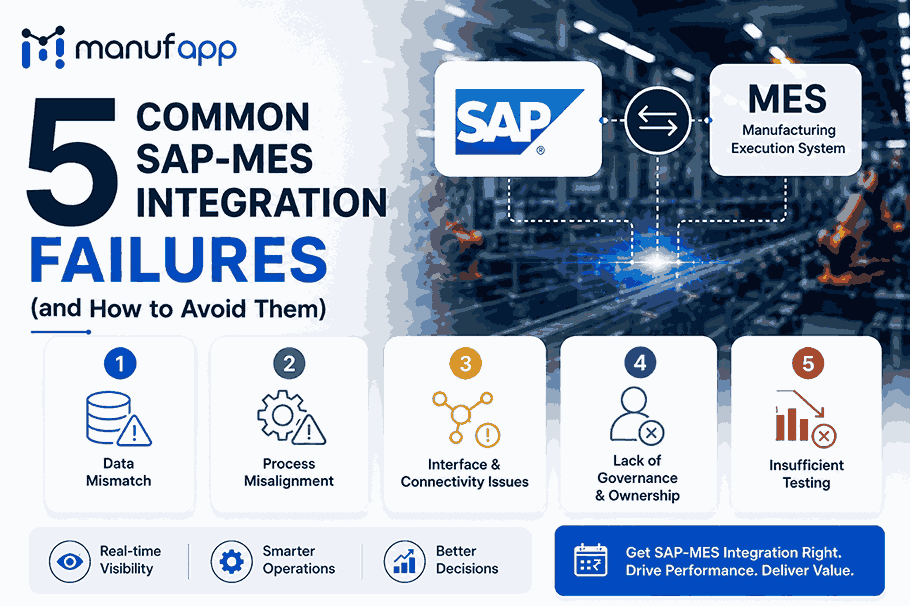


Most SAP MES integration projects fail for the same five reasons: broken real-time data sync, master data drift between systems, point-to-point architecture instead of governed middleware, missing exception handling, and no documented governance model. Each of these is preventable with the right architecture and monitoring approach — covered in detail below.
If you’ve ever had a plant manager ask “why does SAP still show yesterday’s production numbers?” — you already know what a broken MES SAP connection looks like in practice. On paper, integrating your Manufacturing Execution System with SAP sounds like a solved problem. The protocols have existed for two decades, the connectors are documented, and dozens of vendors claim a “seamless” fit.
In reality, most manufacturers we talk to are running two parallel systems that don’t fully trust each other. Shop floor confirmations get entered late — sometimes manually, straight into SAP GUI. Inventory numbers drift from what’s physically on the floor. Finance closes the books on data that’s already stale by the time anyone looks at it.
This isn’t a technology problem. It’s an architecture and process problem. Below, we break down the five failure patterns that show up again and again in MES SAP system projects — across automotive, pharma, food and beverage, and discrete manufacturing plants — and exactly how to avoid each one.
Why SAP MES Integration Breaks Down in the First Place
Before jumping into the failures, it helps to understand the root cause. A SAP MES integration connects two systems with fundamentally different jobs:
- SAP manages business-level data — materials, bills of materials, routings, purchase orders, and finance.
- MES manages execution-level data — what’s happening on the machine, right now, in real time.
When these two layers aren’t synchronized correctly, small delays and mismatches compound fast. A five-minute lag in confirmations becomes a day-old inventory report. A single mismatched material master becomes a plant-wide reconciliation project. That’s exactly where the following five failures come from.
1. Real-Time Data Synchronization Gaps
What happens: Production confirmations, machine status, and quality results don’t flow to SAP as they occur. Instead, data gets batched, delayed, or manually keyed in hours (sometimes days) later.
Why it happens: Many older MES SAP integrations were designed for batch processing, not real-time event streaming. When plants add shifts, new lines, or higher-volume production, the batch window can’t keep up.
Business impact: Inventory, work-in-progress (WIP), and cost figures in SAP no longer reflect the shop floor. Finance closes the month on numbers that were already outdated the moment they were recorded.
How to avoid it:
- Move from scheduled batch jobs to event-driven integration (e.g., SAP Cloud Integration, OPC-UA, or MQTT for real-time machine data).
- Set a clear SLA for how fresh shop-floor data needs to be — minutes, not hours — and design the pipeline around that number.
- Monitor lag as an operational metric, not just an IT metric, so plant managers see it too.
2. Master Data Drift Between SAP and MES
What happens: Bills of materials (BOMs), routings, and work centers exist independently in both SAP and the MES. Over time, someone updates one system and forgets the other — or the two were never truly aligned to begin with.
Why it happens: Master data ownership is rarely assigned to one clear owner. Engineering changes a routing in SAP; the MES team doesn’t get notified. Six months later, nobody can explain why the two systems disagree.
Business impact: Production runs against outdated routings, quality checks get skipped, and troubleshooting a “simple” discrepancy can eat days of engineering time.
How to avoid it:
- Designate a single source of truth for each master data object (usually SAP for BOMs/routings) and push changes downstream automatically.
- Build automated validation checks that flag mismatches before they hit the shop floor, not after.
- Review master data alignment quarterly, not just during go-live.
3. Point-to-Point Architecture Instead of Governed Middleware
What happens: Instead of a structured integration layer, teams build direct, one-off connections between SAP and the MES — and later, between SAP and every other adjacent system (warehouse, quality, scheduling).
Why it happens: Point-to-point connections are faster to build initially, so teams take the shortcut under deadline pressure. Nobody plans for what happens when a third or fourth system joins the mix.
Business impact: Every new system added multiplies the number of direct connections needed. SAP becomes the bottleneck, changes become risky, and a single field change can break three unrelated interfaces.
How to avoid it:
- Treat SAP, MES, and any other shop-floor systems as a governed interoperability platform, not a set of one-off links.
- Use middleware (SAP Integration Suite / SAP CPI, or a similar layer) to expose stable APIs for materials, production orders, and quality data — so SAP isn’t directly coupled to every downstream system.
- Standardize on API contracts before adding a new system, not after.
4. Missing Exception Handling and Error Recovery
What happens: When an interface fails — a duplicate IDoc, a rejected goods movement, a timeout — nobody catches it until someone notices a number doesn’t add up, sometimes weeks later.
Why it happens: Integration projects are usually tested for the happy path (everything working correctly) and under-tested for failure scenarios. Error queues pile up silently in the background.
Business impact: Duplicate postings, IDoc backlogs, and silent data loss. Shop floor teams start distrusting the numbers in SAP altogether — and once that trust is gone, people go back to spreadsheets and side-channels, which defeats the whole point of the integration.
How to avoid it:
- Build retry logic and dead-letter queues into every interface, not just the critical ones.
- Set up alerting so failed transactions surface within minutes, not during month-end close.
- Assign clear ownership for who resolves integration errors — this shouldn’t be a “whoever notices it” job.
5. No Documented Governance or Ownership Model
What happens: Nobody can answer basic questions like “who owns this interface,” “what happens if we change this field,” or “what’s the impact if MES goes down for maintenance.”
Why it happens: Integration is treated as a one-time project rather than an ongoing operational capability. Once the consultants leave, institutional knowledge leaves with them.
Business impact: Every change becomes risky and slow. Plant expansions, acquisitions, or SAP S/4HANA migrations stall because nobody fully understands the existing integration landscape.
How to avoid it:
- Document every interface: what data flows, in which direction, on what trigger, and who owns it.
- Apply a standard integration methodology (such as SAP’s Integration Solution Advisory Methodology) so new interfaces follow the same governance rules as existing ones.
- Revisit the integration architecture before major events like an S/4HANA migration — not during it.
| Failure | Root Cause | Fix |
| Real-time sync gaps | Batch-based design | Event-driven integration, defined SLA |
| Master data drift | No single owner | Single source of truth + auto-validation |
| Point-to-point sprawl | Shortcut under deadline | Governed middleware layer |
| Missing exception handling | Happy-path-only testing | Retry logic, alerting, clear ownership |
| No governance model | Treated as one-time project | Documentation + integration methodology |
How Manufapp Helps
At Manufapp, we work with manufacturers to design SAP MES integrations that hold up under real production pressure — not just during the go-live demo. That means event-driven architecture instead of overnight batch jobs, a governed middleware layer instead of fragile point-to-point links, and documented ownership so your team isn’t relying on institutional memory two years after implementation.
If your MES SAP system is already live but showing signs of these five failures — stale numbers, mismatched master data, or unexplained reconciliation work — that’s usually a sign the underlying architecture needs a review, not a full rebuild.
Frequently Asked Questions
Q1. What is SAP MES integration?
A1. SAP MES integration is the connection between SAP’s ERP system (which manages business data like materials, orders, and finance) and a Manufacturing Execution System (which manages real-time shop floor execution). The goal is to keep both systems synchronized so production data flows automatically instead of being re-entered manually.
Q2. Why does MES SAP integration fail so often?
A2. Most failures are architectural or organizational, not technical. Common causes include batch-based (rather than real-time) data flow, master data drift between systems, point-to-point connections that don’t scale, and a lack of documented ownership for each interface.
Q3. Can SAP MES integration issues be fixed without a full rebuild?
A3. Usually, yes. Many issues — like sync delays or missing error handling — can be resolved by adjusting the integration architecture and adding proper monitoring, without replacing the underlying MES or SAP system.
Q4. Is SAP MES integration different with SAP S/4HANA?
A4. The core principles are the same, but an S/4HANA migration is a natural checkpoint to review and modernize the MES integration architecture, since many older interfaces were built for legacy SAP ECC and may not follow current best practices.
Q5. Which SAP tools are used for MES integration?
A5. The most common tools include SAP Cloud Integration (formerly SAP PI/PO), IDocs, BAPIs, OData services, and REST APIs. For shop-floor connectivity, protocols like OPC-UA and MQTT are typically used alongside these to pull machine-level data into SAP.
Q6. How long does a SAP MES integration project usually take?
A6. Timelines vary by plant complexity, but a single-line pilot integration typically takes 8-12 weeks, while a full multi-plant rollout can take 6-12 months. Projects that skip proper master data alignment or governance planning tend to run longer due to rework.
Q7. What’s the difference between SAP MES and SAP Digital Manufacturing?
A7. SAP MES (via SAP ME/MII) refers to the legacy, on-premise manufacturing execution stack, while SAP Digital Manufacturing is SAP’s newer cloud-based MES built for faster, low-code implementation and tighter native integration with S/4HANA. Many manufacturers are actively migrating from the former to the latter.
Q8. Do I need middleware for SAP MES integration, or can I connect directly?
A8. Direct point-to-point connections can work for a single, simple interface, but they don’t scale. As soon as a second or third system (warehouse, quality, scheduling) needs to talk to SAP, a middleware layer becomes essential to avoid an unmanageable web of one-off connections.
Q9. How do I know if my current SAP MES integration is failing?
A9. Common warning signs include: production data in SAP that’s consistently hours or days old, recurring inventory or WIP mismatches, growing IDoc error queues, and shop floor teams re-entering data manually because they don’t trust the system. Any of these point to an underlying architecture issue.
Q10. Is real-time SAP MES integration necessary for every manufacturer?
A10. Not always. Plants with low-volume, low-complexity production may manage fine with near-real-time (minutes-level) sync. High-mix, high-volume, or regulated environments (pharma, automotive) generally need true real-time integration to avoid compliance and quality risks.